PREMIERE PRO + AFTER EFFECTS
Frooty for Adobe
Generate editable captions, cut silence, import media, and turn review notes into timeline markers from your editing workspace.
Install on a Mac or Windows PC with Premiere Pro or After Effects 2020 or later. Activate with your Frooty account. Timeline tools vary by host.
CAPTIONS
Create editable captions
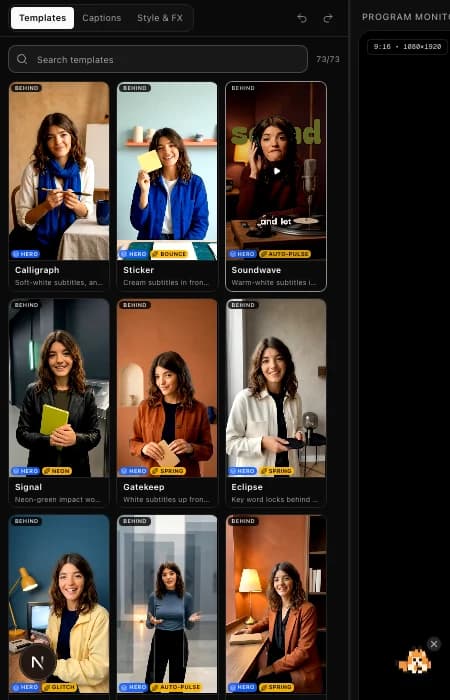
Transcribe a sequence, style animated captions with templates, and add them to your Premiere Pro timeline. Export an SRT when you need a subtitle file.
EDITING TOOLS
Import media and cut silence
Bring permitted online media into Premiere Pro. Remove pauses and filler words from your sequence.
REVIEW
Sync review notes and upload a new cut
See project feedback beside your edit, sync comments as Premiere Pro timeline markers, and upload the active sequence as a new version for review.
AI EDITING · BETA
Review AI edit plans before they run
Use Frooty’s beta agent editing to review a proposed plan before applying supported actions in Premiere Pro. Compatible AI clients can also connect to Premiere Pro through local MCP.
EDITOR EXTENSION
Frooty for Adobe
One extension for Premiere Pro and After Effects.
Premiere Pro / After Effects 2020+ · Activate with your Frooty account.
Installation & setup